SDF Textures - Sixth 3D
Table of Contents
1. What SDF textures are
A regular texture stores coverage: each texel says "this much ink here". That is a photocopy of the glyph — resample it (magnify, minify, view at an angle) and the stored pixels blur or alias, because the information about where the edge is was thrown away when the glyph was rasterized.
A signed distance field (SDF) texture stores something smarter: per texel, the distance to the nearest edge — negative inside the ink, positive outside, zero exactly on the boundary. The rasterizer then re-derives coverage per screen pixel from this smooth field. The edge position survives resampling because the field around it is linear — bilinear interpolation of a linear ramp is exact.

In Sixth 3D the mask is a grayscale field in texture.sdfMask:
0— deep inside the ink127.5— exactly on the edge255— far outside any glyph
The gradient spans only SPREAD_TEXELS = 2.0 texels around the edge —
that narrow band is all the rasterizer needs.
Here is a real field, dumped straight from SdfGlyphCache (glyph "S",
16x32 texels, upscaled 12x with nearest so you can see the texels):

Dark inside the strokes, bright outside, and a smooth gray ramp exactly two texels wide around the contour.
2. Generating glyph fields
SdfGlyphCache generates each character's distance field once and
caches it in a ConcurrentHashMap; stamping a glyph into a canvas is
then just a block copy.

The steps:
- Rasterize the glyph with AWT at 4x the cell size (64x128 pixels) with anti-aliasing on, using Liberation Mono Bold (metric-compatible with Courier New, so the cell grid is unchanged). The font size is auto-shrunk until the widest glyph fits the scratch without clipping — a clipped glyph would corrupt the distance field at the cell edge.
- Distance transform: an exact Euclidean distance transform (Felzenszwalb & Huttenlocher, two separable 1-D passes over parabola envelopes) is run twice — once for distance to nearest ink pixel, once for distance to nearest background pixel.
- Sign, clamp, average: signed distance = dOut - dIn, clamped to +/-2 texels of spread, then the field (not coverage) is averaged down to the 16x32 cell resolution. Averaging the field preserves the edge position; averaging coverage would not.
The font choice matters: Courier's serifs and hairline strokes decay into unresolvable noise when the field is minified. A uniform-stroke bold sans-serif survives.
3. The rendering path
When texture.isSdf() is true (an sdfMask is attached),
TexturedTriangle.paintSdf takes over. Three layers are involved:
| Layer | Contents | Sampling |
|---|---|---|
sdfMask |
glyph shapes (the field) | bilinear |
sdfForeground |
ink color, flat per cell | nearest |
primaryBitmap |
background color, per cell | nearest |
Per screen pixel:
- Sample the mask bilinearly (fixed-point) -> distance
d. - Convert to coverage:
cov = (127.5 - d) * aaK + 128, clamped to [0, 256].aaKscales the 2-texel gradient window to the current pixel footprint (see next section). - Blend:
pixel = bg * (1 - cov) + fg * cov.
Perspective-correct interpolation applies to SDF triangles exactly as it does to regular textured triangles — same affine-sufficiency test, same subdivided correction. See Perspective-correct textures; only the per-pixel sampling differs.
4. Minification without mipmaps
There is deliberately no mipmap chain for SDF layers. A distance field's edge gradient spans ~2 texels; a half-resolution mask melts the glyph edges. Worse, the two triangles of a rectangle cross mip thresholds at slightly different distances, producing a hard diagonal quality split and sudden blur steps while dollying (observed in practice).
Minification is instead handled analytically: the coverage window is widened by the screen-space pixel footprint, giving area-correct coverage straight from the primary field.

The footprint is computed per axis from the screen-space UV gradients —
text on an angled plane is minified mostly along one axis, and an
isotropic average would blur the axis that still has resolution to
spare. The coverage window follows the sharpest axis.
Area-correct coverage alone reads as a low-contrast gray haze, so two perceptual corrections (A/B-tuned on far + angled text) kick in under minification:
- Sharpening (
SDF_SHARPEN, default 2): narrows the coverage window below one pixel — kills the haze halo at the cost of slight shimmer. - Coverage gamma (< 1, automatic from the footprint): darkens stems like a small-size font rasterizer, keeping thin strokes present.
Real output, rendered headlessly through the Snapshot tool:
Magnified — edges re-derived at display resolution, razor sharp:

At moderate distance:

Far away — small but clean, fading to gray instead of disintegrating into aliases (right: 4x nearest zoom of the center):


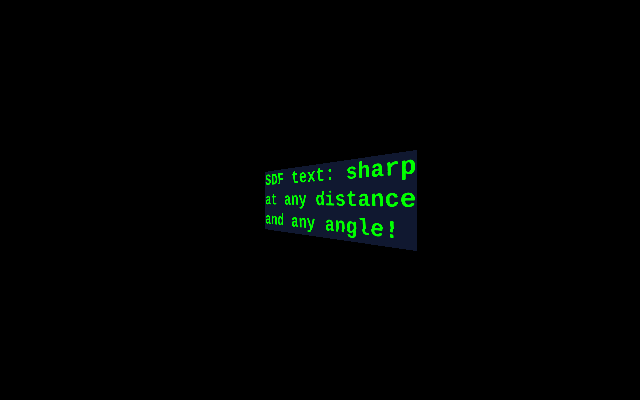
At an oblique angle — foreshortened along one axis, still sharp along the other:
5. Using it
TextCanvas is the main entry point: a textured rectangle carrying a character grid in 3D space. World cell size 8x16 units, texture cell 16x32 texels (2 texels per world unit).
Transform location = new Transform(new Point3D(0, 0, 500));
TextCanvas canvas = new TextCanvas(location, "Hello, World!",
        Color.WHITE, Color.BLACK);
shapeCollection.addShape(canvas);

// blank canvas + cursor writing
TextCanvas blank = new TextCanvas(location, new TextPointer(10, 40),
        Color.GREEN, Color.BLACK);
blank.locate(0, 0);
blank.print("Line 1");
blank.locate(1, 0);
blank.print("Line 2");
blank.setForegroundColor(Color.RED);   // affects subsequent writes
blank.setTextColor(Color.CYAN);        // recolors existing ink only
Colors are per-cell: each putChar fills the cell's rectangle in the
background and foreground layers, so one canvas can hold many colors.
ForwardOrientedTextBlock renders the same pipeline onto a billboard that always faces the camera — for labels that must stay readable from any angle:
ForwardOrientedTextBlock label = new ForwardOrientedTextBlock(
        new Point3D(0, -50, 300), 1.0, 2, "Hello, World!", Color.RED);
shapeCollection.addShape(label);
Real use in the demos: the life demo's help panel (life_demo/Main.java
createHelpPanel()) and the axis labels in CoordinateSystemDemo.
6. Tuning knobs
JVM properties (A/B tuning knobs in TexturedTriangle):
| Property | Default | Effect |
|---|---|---|
e3d.sdf.gamma |
0 (auto) | fixed coverage gamma; auto derives from footprint |
e3d.sdf.sharpen |
2 | coverage window narrowing; 1 = pixel-exact |
e3d.sdf.debug |
false | prints per-triangle footprints and path decisions to stderr |
7. Limitations
- Fixed cell grid: TextCanvas is monospace by construction (16x32 texel cells). Proportional fonts would need a different stamping scheme.
- ASCII-oriented cache:
SdfGlyphCachemeasures printable ASCII (33..126) when sizing the font; exotic glyphs may fit worse. - Under extreme minification text fades to gray by design — that is the correct physical answer (a sub-pixel glyph has no shape left), but it means distant labels are decorative, not readable.
- Bandwidth under minification: sampling the primary field (no mip chain) costs more bandwidth per pixel. Text surfaces are small, so this is the right trade — do not attach SDF masks to huge surfaces.